
Webhooks
Receive event notifications, verify transaction details and keep your application in sync with Strongmb.
What is a webhook?
A webhook is an automatic server-to-server notification sent to your configured URL. Read the top-level
event to decide how to handle the notification.
Configure your webhook
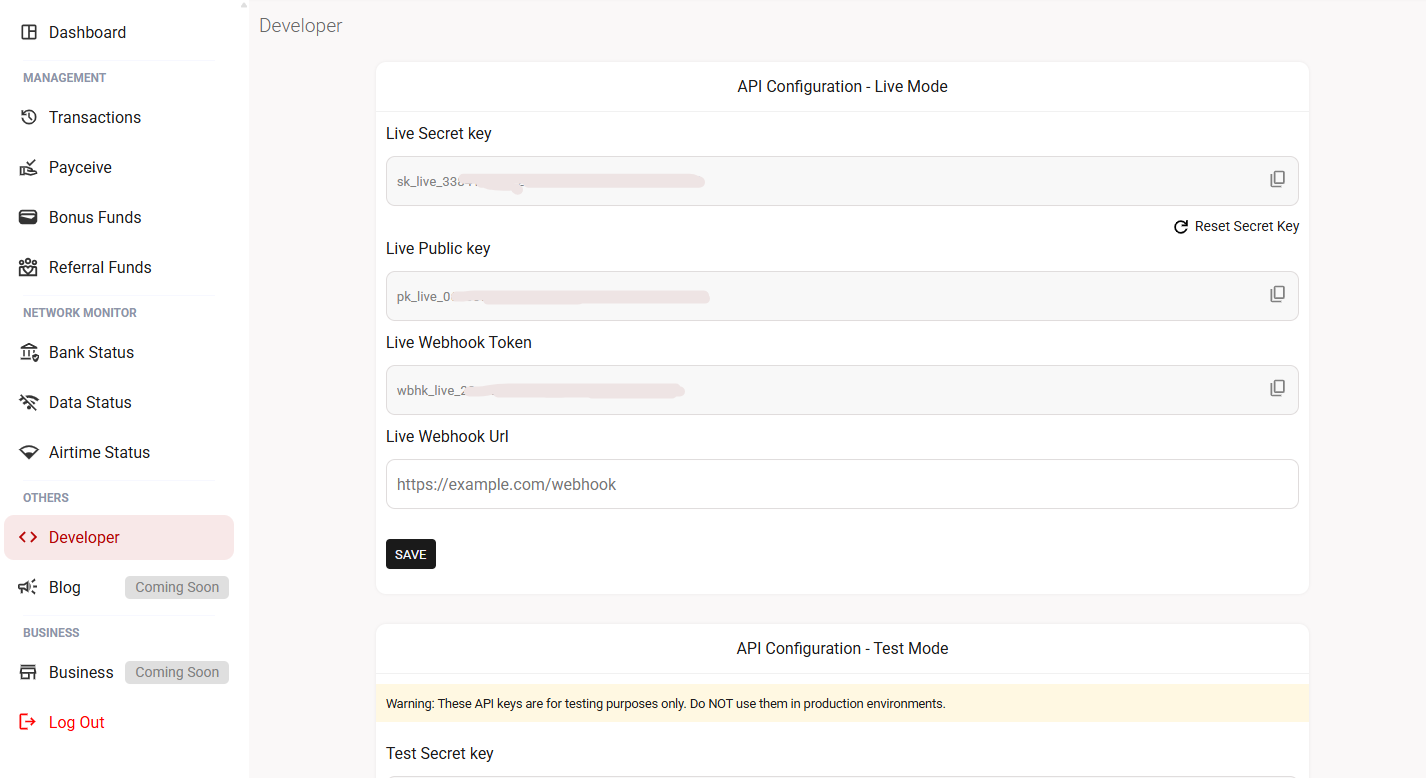
- Sign in to your Strongmb dashboard and open the top-left menu.
- Open Developers and select the live or test environment.
- Enter your server’s HTTPS webhook URL and save it.
- To receive payment, wallet or account events, enable those events in your Strongmb account settings. They are not enabled by default.
- Test your handler and keep live and sandbox processing separate.
Webhook event types
Match the complete event name. An event describes what happened; data.status describes the
transaction record included in a transaction event. Safely ignore event types your application does not
handle.
| Event | Meaning | Subscription |
|---|---|---|
transaction.successful |
A purchase transaction completed successfully. | Transaction event |
transaction.processing |
The transaction is pending. Do not fulfill, refund or submit a replacement purchase yet. | Transaction event |
transaction.failed |
The purchase failed and its refund was issued immediately. A separate credit record represents the refund. | Transaction event |
transaction.refunded |
A refund credit was recorded. Its data.status is refund and direction is credit. | Transaction event |
payment.successful |
A payment succeeded. | Enable in account settings |
payment.processing |
A payment is processing. | Enable in account settings |
payment.failed |
A payment failed. | Enable in account settings |
payment.reversed |
A payment was reversed. | Enable in account settings |
wallet.low_balance |
A wallet low-balance notification. | Enable in account settings |
account.updated |
Account details were updated. | Enable in account settings |
account.suspended |
An account was suspended. | Enable in account settings |
The examples below cover transaction events. Payment, wallet and account events have separate payloads and may not contain a transaction reference.
Read the event envelope
| Field | Type | Meaning |
|---|---|---|
id |
string | Event identifier. Store it to detect repeated delivery of the same event. |
event |
string | Event type, such as transaction.successful or transaction.refunded. |
created_at |
string | Event creation timestamp with a timezone offset. It can differ from the transaction date. |
data |
object | For transaction events, the transaction record itself. Read its reference, direction, status, amount and service details. |
Transaction event examples
The examples below show transaction event payloads. Identifiers and customer details are sample values. The processing and failed payloads demonstrate those states; available fields can vary, and events may arrive out of order.
transaction.successful
{
  "id": "evt_example_001",
  "event": "transaction.successful",
  "created_at": "2026-09-29T23:20:41+01:00",
  "data": {
    "uuid": "3f03aff7-0a47-40e0-8cba-74e84660bca1",
    "wallet_type": "primary_ngn",
    "direction": "debit",
    "category": "product",
    "type": "data",
    "amount": "1000.00",
    "balance_before": "10000000000.00",
    "balance_after": "9999999000.00",
    "description": "This is a test data bundle transaction",
    "reference": "SMBDATABUNDLEREF",
    "status": "successful",
    "date": "2026-09-25T02:30:17+01:00",
    "details": {
      "plan": "10gb",
      "provider": "mtn",
      "recipient": "0812345678",
      "data_type": "gifting",
      "validity": "30days",
      "title": "10gb mtn gifting data",
      "performed_via": "api"
    }
  }
}
transaction.processing
{
  "id": "evt_example_002",
  "event": "transaction.processing",
  "created_at": "2026-09-29T23:20:41+01:00",
  "data": {
    "uuid": "3f03aff7-0a47-40e0-8cba-74e84660bca1",
    "wallet_type": "primary_ngn",
    "direction": "debit",
    "category": "product",
    "type": "data",
    "amount": "1000.00",
    "balance_before": "10000000000.00",
    "balance_after": "9999999000.00",
    "description": "Illustrative processing transaction",
    "reference": "SMBDATABUNDLEREF",
    "status": "processing",
    "date": "2026-09-25T02:30:17+01:00",
    "details": {
      "plan": "10gb",
      "provider": "mtn",
      "recipient": "0812345678",
      "data_type": "gifting",
      "validity": "30days",
      "title": "10gb mtn gifting data",
      "performed_via": "api"
    }
  }
}
transaction.failed
{
  "id": "evt_example_003",
  "event": "transaction.failed",
  "created_at": "2026-09-29T23:20:41+01:00",
  "data": {
    "uuid": "06b2c902-95b4-432b-a18d-088867cda04b",
    "wallet_type": "primary_ngn",
    "direction": "debit",
    "category": "product",
    "type": "data",
    "amount": "6600.00",
    "balance_before": "498925.56",
    "balance_after": "492325.56",
    "description": "-",
    "reference": "SMBDATABUNDLEREF",
    "status": "failed",
    "date": "2026-09-28 22:57:30.599887+01",
    "details": {
      "plan": "10gb",
      "provider": "mtn",
      "recipient": "0123456789",
      "data_type": "sme",
      "validity": "30days",
      "title": "10gb mtn sme data",
      "performed_via": "website"
    }
  }
}
transaction.refunded
{
  "id": "evt_example_004",
  "event": "transaction.refunded",
  "created_at": "2026-09-29T23:20:41+01:00",
  "data": {
    "uuid": "b2244696-9d96-4ab1-a982-2430370148e8",
    "wallet_type": "primary_ngn",
    "direction": "credit",
    "category": "product",
    "type": "data",
    "amount": "6600.00",
    "balance_before": "492325.56",
    "balance_after": "498925.56",
    "description": "Data purchase refund for SMBDATABUNDLEREF",
    "reference": "SMBDATABUNDLEREF",
    "status": "refund",
    "date": "2026-09-28 22:57:30.88908+01",
    "details": {
      "plan": "10gb",
      "provider": "mtn",
      "recipient": "0123456789",
      "data_type": "sme",
      "validity": "30days",
      "title": "10gb mtn sme data",
      "performed_via": "website"
    }
  }
}
Understand failed purchases and refund credits
When a purchase returns data.status: failed, Strongmb has immediately issued the refund. A later GET /transactions/{reference} lookup may return
data.transaction.status: refund. This means the purchase failed and was refunded; it is not a
pending refund or a successful purchase. Strongmb sends the refund notification as
transaction.refunded.
Do not wait for the refund webhook to interpret an authenticated failed purchase response as refunded. Keep your own customer ledger consistent and apply each adjustment
only once. This applies to a confirmed transaction status, not a validation error, timeout or
processing response.
A failed purchase is a debit record with status: failed. Its refund is a separate
credit record with status: refund. Both records share the purchase reference. The
webhook event is transaction.refunded.
Use the reference to associate records with an order and the event ID to identify repeated notifications. A refund record is not a successful purchase and must not trigger fulfillment. Do not issue another wallet refund merely because you received this event: it reports a credit already recorded by Strongmb.
Verify before updating an order
- Read
eventand validate the expected structure for that event. - For transaction events, match
data.referenceto an order your application created. - Query
GET /transactions/{reference}with your server-side secret key. Checkmetadata.codein the lookup response. - Compare the returned reference, amount, service and recipient with your order. Check the record’s UUID, direction and status to distinguish a purchase from a refund.
- Apply the verified change atomically and only once. Return a successful HTTP response after the notification has been accepted or durably queued.
Reference lookup may return the refund credit with data.transaction.status: refund. Treat that
as a failed purchase whose refund has already been issued. The purchase and refund share the original
reference; transaction history shows the separate ledger records.
Handle repeated or delayed events
Store event IDs and make order updates idempotent. Also guard against processing the same transaction UUID and event type twice. Do not discard every later event with the same purchase reference: a processing update, final outcome and refund credit can concern the same order.
Do not assume delivery order. Verify the current state before applying a delayed update. Keep the handler fast by durably queuing work when necessary. No fixed retry interval is specified.
Recover when an update is missing
A timeout or missing webhook does not prove that a purchase failed. Query unresolved orders using the saved reference. Keep processing orders pending without premature refunds or replacement purchases. If the customer has not received the purchased service, contact support with the reference and the trace ID from your lookup response.
See transaction verification for reconciliation guidance.
Questions? Let’s work through them.
Having an issue or need help with your integration? Join the Strongmb Slack community to ask questions and get assistance from our team and other developers.
Keep API keys and customer details private when sharing examples.
Experiencing a service issue? Check Strongmb’s service status for incident updates.
Did this page help you?
Up to 100 characters. Please leave out personal details, account information and API keys.